555VU Unclaimed Rewards: Don’t Miss What You Earned
Rewards you have earned but not collected wait quietly in their own tab. Here is where to find them and how to make sure none slip away.
Key takeaways
- Unclaimed is one of five tabs in the promotion center.
- Tap Refresh rewards, then check Unclaimed.
- Confirm payouts with the History button.
- Claiming is always free.
What the Unclaimed Tab Is
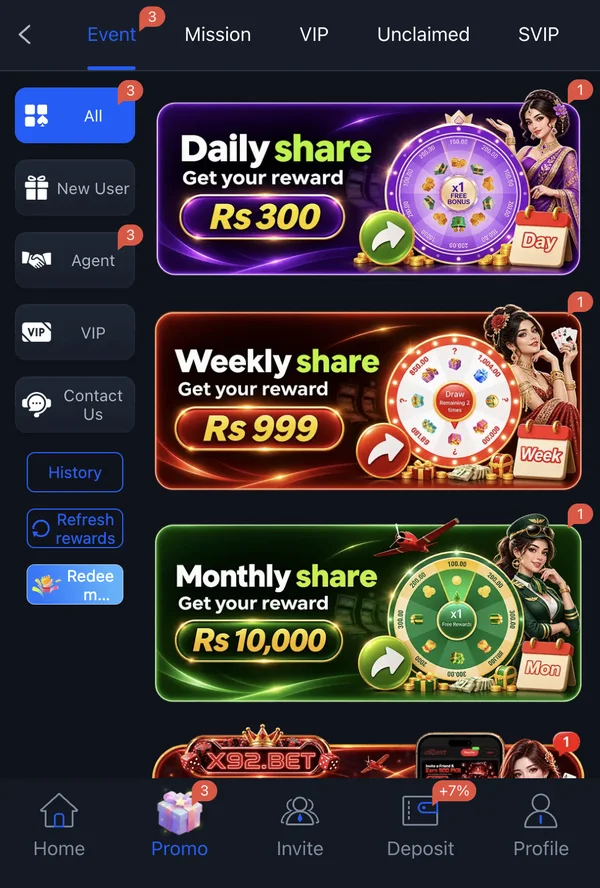
The promotion center has five tabs across the top: Event, Mission, VIP, Unclaimed and SVIP. Unclaimed gathers rewards you qualified for but have not yet collected, from mission chests to event payouts.
Why Rewards End Up Unclaimed
Missions finished in passing
You complete a task without noticing the reward.
Daily resets
New lists appear and old rewards wait to be collected.
Rewards not refreshed
The Refresh rewards button updates what you see.
Busy sessions
Quick games leave little time to check Promo.
A 30-Second Claim Routine
- 1
Open Promo
From the bottom menu.
- 2
Tap Refresh rewards
In the Event side menu.
- 3
Check Unclaimed
Collect anything waiting.
- 4
Confirm in History
Make sure it paid out.
Watch for Expiry and Conditions
Some rewards may expire if not claimed, and many arrive as bonus money with wagering. Collect promptly, then check whether the reward is withdrawable or tied to conditions before planning around it.
Collecting a reward is free. If anyone asks you to pay to “unlock” unclaimed rewards, it is a scam.
More 555VU Guides
555VU APK Latest Version: How to Always Get the Newest App
How to check you are on the newest 555VU app, update safely and avoid outdated or fake files.
Read article
555VU Home Screen Explained, Button by Button
A tour of every part of the 555VU home screen, from the balance bar to the bottom menu.
Read article
555VU Daily Cashback and Rebates Explained
How the “up to 3% daily cashback” and the first deposit rebate work, in plain words.
Read article